Is your laptop sized right? Two weeks of evidence says.
SizeMyLaptop records CPU, GPU and memory pressure every 30 minutes, then builds one PDF that answers the question before you buy the 64 GB model.
curl -fsSL https://sizemylaptop.com/install.sh | bashPaste into Terminal on the laptop you want to measure.
How it works, in three steps
-
Install with one command
The installer downloads the tool from sizemylaptop.com, checks its SHA-256 checksum, and only then installs the
baselinecommand. A mismatch stops the install. -
Leave it running for one to two weeks
baseline starttakes a capture every 30 minutes while the laptop is awake: CPU, GPU and memory pressure, plus a snapshot of what is running. Keep working as you normally would. -
Build one PDF
baseline buildassembles every capture into a single report with charts, headline numbers and an appendix. It lands on your Desktop.
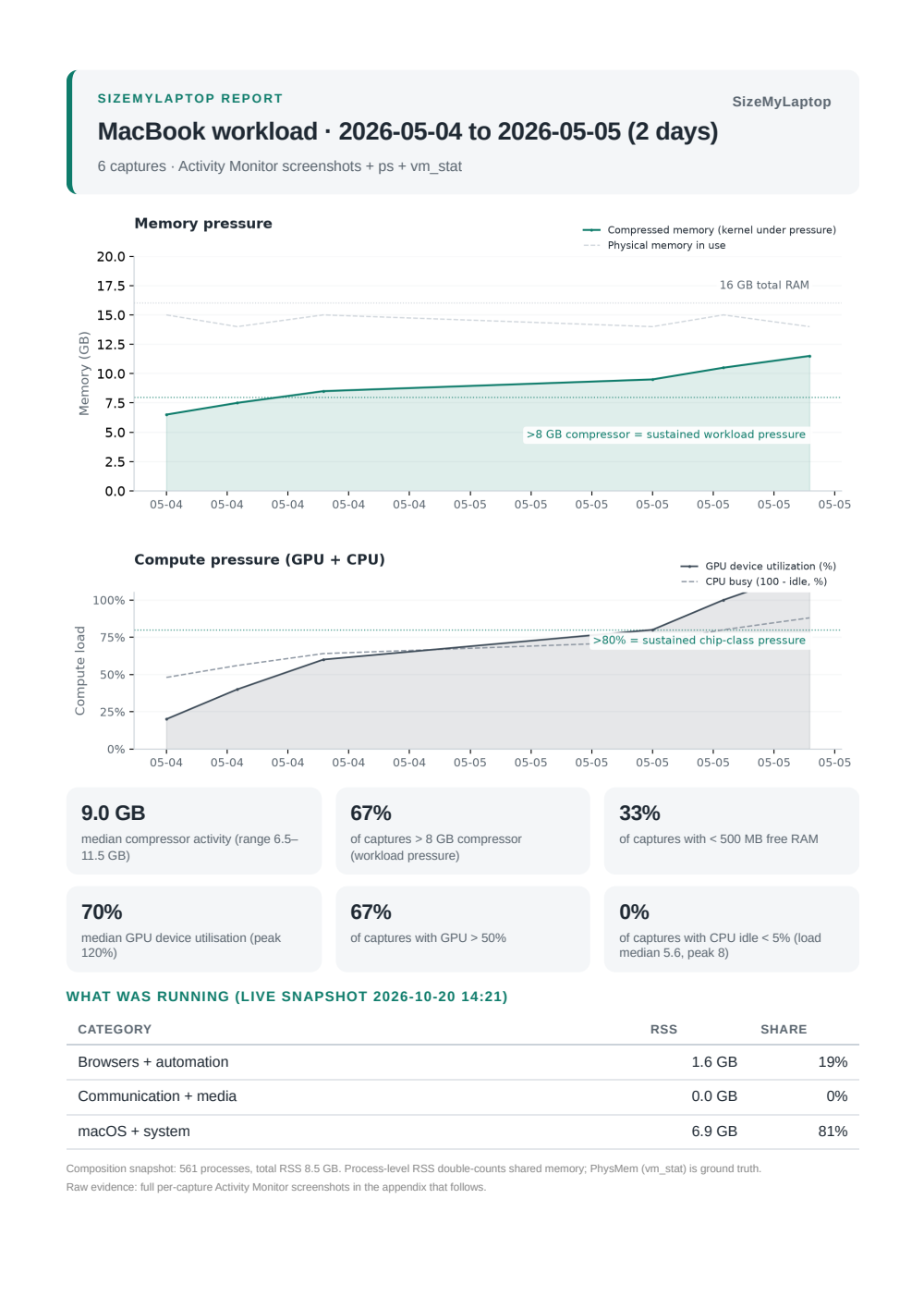
A sample report, page one
The report starts with the question and the answer the data supports, then the time series, the headline numbers and a per-capture appendix. Nothing in it is a guess.
Questions
Does anything leave my laptop?
No. Captures are written to a folder on your laptop and the PDF is built there. The only network request is the one-time download of the tool from sizemylaptop.com, which the installer checks against a published checksum.
Is SizeMyLaptop free?
Yes. It is free and open source under the MIT licence. You can read, change and reuse the code.
How long should I run it?
One to two weeks of normal use. Two weeks covers a full working cycle, so the report reflects your real habits rather than one busy afternoon.
What does the report actually answer?
Whether memory pressure stayed high during your real work, and how often CPU and GPU were the limit instead. It is evidence for a decision, not a verdict. The report shows the numbers behind every statement.
Does the Windows version work?
The Windows version has been code-reviewed but not yet tested on a real Windows machine. Treat its first report as a test run and tell us what broke.
How do I stop it or remove it?
On macOS, baseline stop ends further captures and baseline uninstall removes the scheduled job. Your captured data is kept in its folder until you delete it yourself.
Privacy
Everything stays local. Nothing is uploaded. No telemetry is collected.
Captures, charts and the PDF are created and kept on the laptop you measure. The installer makes one download from sizemylaptop.com and checks it before running. This website runs no analytics scripts; like any website, its host logs ordinary web requests.
Guides
- Do I need more RAM on my Mac?
How to decide from evidence instead of how full the memory looks.
- Memory pressure, explained
What the macOS and Windows numbers mean, and which ones to trust.
- Is the 64 GB MacBook worth it?
When extra memory is the fix, and when it will not change anything.
- Laptop sizing for IT teams
Measuring a fleet fairly, and setting thresholds before the data arrives.
- Checking RAM usage on Windows
The Windows counters that matter, and where Task Manager misleads.